Sunday, August 30, 2009

SpyDLLRemover: A Weapon Against Spywares

SpyDLLRemover is the standalone tool to efficiently detect and delete spywares from the system. It uses multiple techniques such as direct syscall implementation, CSRSS process handle detection, PIDB method etc to find out the user land rootkit processes.

But the main focus of the tool is to help in removing malicious DLLs quickly and easily by displaying all DLLs within the process with various threat levels and then using the DLL injection based technique to unload them completely. It employs low-level implementation that makes it effective against any userland rootkits.
SpyDLLRemover in Action
This image has been resized.Click to view original image

Features:

* Detect hidden userland rootkit processes using multiple techniques
* Detect the hidden DLL/module within process by using loaded list traversal technique.
* It uses the direct system calls to perform process related operations which defeats any attempt to hide by userland rootkits.
* Separate out the modules/DLLs based on the various threat levels such as hidden dll, BHO plugin dll, and system dll, AppInit DLL etc that makes it effective to detect malicious modules.
* DLLs are marked with different color based on threat level, which makes it easy and quick to eliminate the spyware DLLs.
* It presents state of art technique for Removing the DLL from Remote Process based on DLL Injection method to completely unload the DLL in just one click.
* Terminate any suspicious or hidden process directly using NT system calls.
* It has integrated online verification mechanism through ProcessLibrary.com to validate any suspcious DLLs.
* Displays detailed information about all running processes on the system
* Shows detailed information about each loaded DLLs within process to make it easier for manual analysis.
* It is standalone tool which can be executed directly as it does not require any installation.


Code:
http://rootkitanalytics.com/userland/spy-dll-remover.php

Know More About Secure Sockets Layer (SSL)

Know More About Secure Sockets Layer (SSL)

Secure Sockets Layer (SSL) is the most widely used technology for providing a secure communication between the web client and the web server. Most of us are familiar with many sites such as Gmail, Yahoo etc. using https protocol in their login pages. When we see this, we may wonder what’s the difference between http and https. In simple words HTTP protocol is used for standard communication between the Web server and the client. HTTPS is used for a SECURE communication.

What exactly is Secure Communication ?

Suppose there exists two communication parties A (client) and B (server).

Working of HTTP

When A sends a message to B, the message is sent as a plain text in an unencrypted manner. This is acceptable in normal situations where the messages exchanged are not confidential. But imagine a situation where A sends a PASSWORD to B. In this case, the password is also sent as a plain text. This has a serious security problem because, if an intruder (hacker) can gain unauthorised access to the ongoing communication between A and B , he can see the PASSWORDS since they remain unencrypted. This scenario is illustrated using the following figure

This image has been resized.Click to view original image


Now lets see the working of HTTPS

When A sends a PASSWORD (say "mypass") to B, the message is sent in an encrypted format. The encrypted message is decrypted on B’s side. So even if the Hacker gains an unauthorised access to the ongoing communication between A and B he gets only the encrypted password ("xz54p6kd") and not the original password. This is shown below


This image has been resized.Click to view original image


How is HTTPS implemented ?

HTTPS is implemented using Secure Sockets Layer (SSL).A website can implement HTTPS by purchasing an SSL Certificate. Secure Sockets Layer (SSL) technology protects a Web site and makes it easy for the Web site visitors to trust it. It has the following uses

1.An SSL Certificate enables encryption of sensitive information during online transactions.

2.Each SSL Certificate contains unique, authenticated information about the certificate owner.

3.A Certificate Authority verifies the identity of the certificate owner when it is issued.


How Encryption Works ?

Each SSL Certificate consists of a Public key and a Private key. The public key is used to encrypt the information and the private key is used to decrypt it. When your browser connects to a secure domain, the server sends a Public key to the browser to perform the encryption. The public key is made available to every one but the private key(used for decryption) is kept secret. So during a secure communication, the browser encrypts the message using the public key and sends it to the server. The message is decrypted on the server side using the Private key(Secret key).


How to identify a Secure Connection ?


In Internet Explorer, you will see a lock icon in the Security Status bar. The Security Status bar is located on the right side of the Address bar.You can click the lock to view the identity of the website.

In high-security browsers, the authenticated organization name is prominently displayed and the address bar turns GREEN when an Extended Validation SSL Certificate is detected. If the information does not match or the certificate has expired, the browser displays an error message or warning and the status bar may turn RED.


So the bottom line is, whenever you perform an online transaction such as Credit card payment, Bank login or Email login always ensure that you have a secure communication. A secure communication is a must in these situations.Otherwise there are chances of Phishing using a Fake login Page.

Tips to Find Unauthorized Activity on Your Email Account

Do you suspect that your email account is under attack? Do you want to maintain total security of your email account and make it 100% hack proof? Well, Some times our email account might have got hacked and we may not be aware of that. We may believe that our email account is safe, but in reality our private and confidential information may be falling into the hands of a third person.

Here are some signs of unauthorized activity on an email account--

1. Your new emails are marked as Read even if you’ve not read them.

2. Your emails are moved to Trash or even permanently deleted without your notice.

3. Your emails are being forwarded to a third party email address (check your settings->forwarding).

4. Your secondary email address is changed.

If you come across any of the above activities on your email account, then it is a clear indication that your email account is hacked.

Additional Security Features in Gmail to ensure the Safety of your Account

Gmail provides an additional security feature to protect your email account through the means of IP address logging. That is, Gmail records your IP address every time you login to your Gmail account. So, if a third party gets access to your account then even his/her IP is also recorded. To see a list of recorded IP address, scroll down to the bottom of your Gmail account and you’ll see something like this.


You can see from the above figure that Gmail shows the IP address of last login (last account activity). You can click on Details to see the IP address of your last 5 activities. If you find that the IP listed in the logs doesn’t belong to you, then you can suspect unauthorized activity.

Steps to be carried out to stop unauthorized activity on your email account--

If you feel/suspect that your account is hacked then you must immediately take the actions mentioned below

1. Change your Password

2. Change your security question.

2. Remove any third party email address (if any) to which your account is set to forward emails.

3. Make sure that you can access the email account of your secondary email address.

4. Also change you secondary email password and security question.

This ensures that your account is safe from future attacks. But I strongly recommend that you my another post to protect your email account from being hacked.

Unlocking the iphone!!

Unlocking the iphone-


As we all know, iPhone is Subscriber Identity Module (SIM) locked. This means iphone was designed for and can be used by one carrier—AT&T in the United States—and offers a limited set of iPhone-compatible voice and data plans. Within weeks of its release, a hacker named iZsh created a tool named iASign, which allowed iPhone owners to unlock and use their phones with AT&T/Cingular plans that were not designed for the iPhone, including pay-as-you-go plans.


A month or two later, the iPhone Dev Team hackers released the iUnlock and anySIM tools (see Figure above), which allowed the iPhone to be unlocked and used with any Global System for Mobile communications (GSM) SIM from around the world.Within days of its release, the iPhone had been unlocked and used in dozens of countries,from Malaysia to Jamaica and from Norway to Pakistan.

Reacting to the iPhone Unlock tool, Steve Jobs said, “It’s a cat-and-mouse game. We try to stay ahead. People will try to break in, and it’s our job to stop them breaking in.” In late September 2007, Apple issued the following statement in a press release:

"Apple has discovered that many of the unauthorized iPhone unlocking programs available on the Internet cause irreparable damage to the iPhone’s software,which will likely result in the modified iPhone becoming permanently inoperable when a future Apple-supplied iPhone software update is installed.Apple plans to release the next iPhone software update,containing many new features including the iTunes Wi-Fi Music Store(http://www.itunes.com/), later this week.Apple strongly discourages users from installing unauthorized unlocking programs on their iPhones.Users whomake unauthorized modifications to the software on their iPhone violate their iPhone software license agreement and void their warranty.The permanent inability to use an iPhone due to installing unlocking software is not covered under the iPhone’s warranty".

After releasing firmware update 1.1.1 for iPhone, Apple refused warranty service to bothunlocked phones and phoneswith third-party applications. Caveat emptorand hacker beware.

Learn What is Phishing and save your money from Hackers

What is Phishing ?


Phishing is an attempt to criminally and fraudulently acquire sensitive information, such as usernames, passwords and credit card details, by appearing as a trustworthy entity in an electronic communication. eBay, PayPal and other online banks are common targets. Phishing is typically carried out by email or instant messaging and often directs users to enter details at a website, although phone contact has also been used. Phishing is an example of social engineering techniques used to fool users.Attempts to deal with the growing number of reported phishing incidents include legislation, user training, public awareness, and technical measures.

Recent phishing attempts have targeted the customers of banks and online payment services.Social networking sites such as Orkut are also a target of phishing.

Spoofed/Fraudulent e-mails are the most widely used tools to carry out the phishing attack.In most cases we get a fake e-mail that appears to have come from a Trusted Website . Here the hacker may request us to verify username & password by replaying to a given email address.


TECHNIQUES BEHIND PHISHING ATTACK

1.Link Manipulation

Most methods of phishing use some form of technical deception designed to make a link in an email appear to belong to some trusted organization or spoofed organization. Misspelled URLs or the use of subdomains are common tricks used by phishers, such as this example URL

www.micosoft.com

www.mircosoft.com

www.verify-microsoft.com

Instead of http://www.microsoft.com/

2.Filter Evasion

Phishers have used images instead of text to make it harder for anti-phishing filters to detect text commonly used in phishing emails.This is the reason Gmail or Yahoo will disable the images by default for incoming mails.

How does a phishing attack/scam look like?

As scam artists become more sophisticated, so do their phishing e-mail messages and pop-up windows.They often include official-looking logos from real organizations and other identifying information taken directly from legitimate Web sites.Here is an example of how the phishing scam email looks like


Example of a phishing e-mail message, including a deceptive URL address linking to a scam Web site.
To make these phishing e-mail messages look even more legitimate, the scam artists may place a link in them that appears to go to the legitimate Web site (1), but it actually takes you to a phishing site (2) or possibly a pop-up window that looks exactly like the official site.
These copycat sites are also called “spoofed” Web sites. Once you’re at one of these spoofed sites, you may send personal information to the hackers.

How to identify a fraudulent e-mail?

Here are a few phrases to look for if you think an e-mail message is a phishing scam.

“Verify your account.”

Legitimate sites will never ask you to send passwords, login names, Social Security numbers, or any other personal information through e-mail.

“If you don’t respond within 48 hours, your account will be closed.”

These messages convey a sense of urgency so that you’ll respond immediately without thinking.

“Dear Valued Customer.”

Phishing e-mail messages are usually sent out in bulk and often do not contain your first or last name.

“Click the link below to gain access to your account.”

HTML-formatted messages can contain links or forms that you can fill out just as you’d fill out a form on a Web site. The links that you are urged to click may contain all or part of a real company’s name and are usually “masked,” meaning that the link you see does not take you to that address but somewhere different, usually a scam Web site.
Notice in the following example that resting the mouse pointer on the link reveals the real Web address, as shown in the box with the yellow background. The string of cryptic numbers looks nothing like the company’s Web address, which is a suspicious sign.


So the Bottom line to defend from phishing attack is-

1.Never assume that an email is valid based on the sender’s email address.
2.A trusted bank/organization such as paypal will never ask you for your full name and password in a PayPal email.
3.An email from trusted organization will never contain attachments or software.
4.Clicking on a link in an email is the most insecure way to get to your account.

How To Prevent Your Twitter Account from Being Hacked

Twitter, with its increased popularity have obviously been at the dark sight of crackers. They try phishing to manipulate your account and also hijack your twitter profile to irritate your followers too. That may seriously harm your reputation and credentials though you were never aware of such issues yourselves. The scammers put up websites that look exactly like Twitter. These websites prompt you to login with your Twitter username and password and then use your Twitter account to spam your followers. They send direct messages and @replies under your account with their phishing url. Your followers may then click on the link, give their credentials and have the exact same thing happen. And this cycle will grow bigger each day. So what can you do to prevent them?


1. Don't Trust any other Domain but Twitter
Whoever gives you a link or from whatever sources, do not log in with your twitter account anywhere excepting http://twitter.com. Check your browsers address bar before logging in and make sure its correct. look at this site for a change which has been a culprit in the recent past. Here is a screen-shot of that site:


[Do not click on that link unless you are too curious]

2. Do not Share Your Account Information with Anybody
Be very careful what outside Twitter applications you give your password to. If an outside application asks for your password, read their terms and do a little research on who is behind the application. If wary at all don’t give your password. There may be twitter tools which can harm you that way. Any third party twitter tool should not be trusted.

3. Do not Trust any Mail that Claims to Have Come from Twitter
If you receive an email notice saying you’ve received a Direct Message with a link that redirects to what seems like Twitter.com, be careful about entering your Twitter credentials. Instead, look closely at the URL to see if it’s not really Twitter but a sketchy phishing site. If you are not sure, then don't click on it.


These are the three main tips I have for now to share with you. If you have more suggestion, please write to us and we will publish it for the benefit of others (with your name as the contributor).

Latest Labs Feature in Gmail Adds Anti-Phishing Key For Ebay and PayPal


Recently Gmail labs team introduced a new security feature to completely stop spam and phishing emails. Last year they started a program for spam filtration from fake eBay and PayPal mails.


What does this feature do?


As most of the people were not aware of the spam filtration feature so Gmail team decided to create an actual icon for a verified account so people would recognize an email address that’s legitimate. After enabling this feature you will see a super-trustworthy icon next to verified emails so that you can know that they are not trustworthy but super-trustworthy.


According to the official blog super-trustworthy means :


1. The sender, usually a financial institution, is a target of phishers
2. All of the sender’s email is authenticated with DKIM
3. Gmail rejects any fake messages that claim to come from this sender, but actually don’t.
Currently this feature is limited to eBay and Paypal only but they hope to add more senders in the future.

How to enable it

Visit Gmail settings >> Labs and look for “Authentication icon for verified senders”, select Enable beside it and click on Save changes at the bottom.

Tips to Improve Email Privacy


Many websites ask for your email address when you shop online, download a free software etc. But do you know that this has a chance of affecting your email privacy through Spam emails?

Though most websites don’t use spamming as an email marketing strategy, there are a few that use junk emails that don’t care about anti-Spam laws. Here are some tips to maintain your email privacy from such threats.
Before submitting your email address you need to check the reputation of the company. Reputed websites would normally follow the right email practices to ensure your email privacy. Such companies will never want to loose their hard earned reputation by getting blammed for spamming.

See whether the websites provides email privacy statements. You need to go through these statement in detail, and know about the kind of emails that will be sent to you, how often etc. Based on this you can decide on whether you need such emails. You don’t want to give your email address to some fraud company that is thinking about handing over your email address to hundreds of other websites.

Finally, check whether the website really respects your privacy. Often you will find some text like “I agree to receive email” that comes with a check box. You can agree to receive emails by checking the check box. If the check box is already checked, it is just a good indication that the website doesn’t respect your privacy. So watch out!

How To Get Back Your Hacked Gmail/Orkut/Google Account!


This is my official reply to all mails/comments/scraps asking me how to get back hacked Gmail/Orkut/Google Account (Most of Mine orkuts friends A/cs are hacked in recent past)
Everyone should read this no matter how safe you think you are! ;-) As Google Account is a single account used across all Googles services like Gmail, Orkut, Blogger, Adsense, Checkout. etc, it can turn out to be our worst nightmare if it gets hacked! Like many other online services Google tries to protect your account with secret question as well as optional secondary email address. But there is one more official option which only Google Provides! Now lets go step-by-step?


#1. Trying "Forget Password" Option

I know this will not work in most cases, as options like forget password rely on secondary email address and security question, both of which can be easily changed once a account gets hacked. Still you should try atleast once as most password gets hacked by script kiddies and not by real hackers. So go to Forget Password form first!


#2. What if "Forget Password" Option Fails

You can submit a form to Google in which you can provide details about your Google Account usage. Details include information which most likely only real owner can provide. Here are few things for example?

* Last successful login date
* Account creation date
* Google products you used with this account and the date you started using each one
* Details about Orkut account (if you use Orkut)
* Details about Blogger account (if you use Blogger)

Now most important part is what they quoted on the form,

"Please answer each question as thoroughly and accurately as possible. If you?re not certain about some of the information, provide your closest estimate. Whether or not we can return your account depends on the strength and accuracy of your responses."

So I will suggest following things?

* Your goal should be to give Google maximum & accurate data! So take your time and submit form with maximum amount of information possible. You can consult your trusted friends if you are not sure. As an example it could be Vicky or Pankaj who invited you on orkut. If you are not sure call them up and ask it!
* Submit only one form! Yes this should be common sense. Do not submit multiple forms. A person who uses around 10-15 Google products asked me if he can submit multiple forms mentioning different Google products.
* Submit form from the place which you use most often to access your account like PC at home! Although they haven?t mentioned this explicitly, line above submit button says, "Please note that we need your IP address in order to resolve this issue. Your IP address will be captured automatically when you submit this form."


Finally Contact Form is here!


Code:
http://www.google.com/support/accounts/bin/request.py?contact_type=ara&ctx=accounts&hl=en
I advise everyone to have a look at this form and information it asks. You can prepare a document about secret info, may be in cell phone or pen down it on a paper. This will come handy if something goes wrong in future!

How to Hack Protect your Orkut Account

Most of the people wants to know How to hack an Orkut accountwhich I am going to post later.But here I am giving you a detailed information about how to protect your Orkut accounts.As we all know most of the Google services are still in BETA.So,websites like Orkut, powered by Google is not totally secure!Several people feel proud in hacking other user’s account. You do a foolish thing, and next day your account is hacked. This is very sad indeed, but hackers are adding names to their victims list till now.

This image has been resized.Click to view original image


How can a hacker hack my Orkut account?

As I told the answer to this question is coming is my later posts.

But this post is meant for providing some safety measures to prevent your Orkut account from being hacked.There is not much you have to take care of. Just follow the simple steps and never get your orkut account hacked in your life.

1. Never try to login/access your Orkut account from sites other than Orkut.com.

2. Never click on any links from the sources you don’t trust while accessing your Orkut account.(or while accessing any other Google services like Gmail,Blogger etc.)

3. Delete any links on your scrapbook, no matter if a known or unknown person have sent it.

4. Never disclose your orkut login details with anyone.

5. Never ever use Javascripts on Orkut, no matter whatever it claims to do.Get satisfied with the services provided by default! Avoid using third party Scripts which might be malicious.

6. Never get excited to see a site claiming to have 1000 cool orkut tricks for which you have to just log in to your orkut account. Don’t trust that site. That’s a phishing site.

7. Never tick the box “REMEMBER ME” on the orkut homepage if you are surfing from a cafe or a public area.

8. Always remember to hit Sign out button, when you are done.

Top 10 reasons how websites get hacked

Experts say the people who actually build Web applications aren't paying much attention to security; a non-profit group is trying to solve that
By Jon Brodkin, Network World
October 05, 2007

Web security is at the top of customers' minds after many well-publicized personal data breaches, but the people who actually build Web applications aren't paying much attention to security, experts say.

"They're totally ignoring it," says IT consultant Joel Snyder. "When you go to your Web site design team, what you're looking for is people who are creative and able to build these interesting Web sites... That's No. 1, and No. 9 on the list would be that it's a secure Web site."

The biggest problem is designers aren't building walls within Web applications to partition and validate data moving between parts of the system, he says.

Security is usually something that's considered after a site is built rather than before it is designed, agrees Khalid Kark, senior analyst at Forrester.

"I'd say the majority of Web sites are hackable," Kark says. "The crux of the problem is security isn't thought of at the time of creating the application."

That's a big problem, and it's one the nonprofit Open Web Application Security Project (OWASP) is trying to solve. An OWASP report called "The Ten Most Critical Web Application Security Vulnerabilities" was issued this year to raise awareness about the biggest security challenges facing Web developers.

The first version of the list was released in 2004, but OWASP Chairman Jeff Williams says Web security has barely improved. New technologies such as AJAX and Rich Internet Applications that make Web sites look better also create more attack surfaces, he says. Convincing businesses their Web sites are insecure is no easy task, though.

"It's frustrating to me, because these flaws are so easy to find and so easy to exploit," says Williams, who is also CEO and co-founder of Aspect Security. "It's like missing a wall on a house."

Here is a summary of OWASP's top 10 Web vulnerabilities, including a description of each problem, real-world examples and how to fix the flaws.

1. Cross site scripting (XSS)

The problem: The "most prevalent and pernicious" Web application security vulnerability, XSS flaws happen when an application sends user data to a Web browser without first validating or encoding the content. This lets hackers execute malicious scripts in a browser, letting them hijack user sessions, deface Web sites, insert hostile content and conduct phishing and malware attacks.

Attacks are usually executed with JavaScript, letting hackers manipulate any aspect of a page. In a worst-case scenario, a hacker could steal information and impersonate a user on a bank's Web site, according to Snyder.

Real-world example: PayPal was targeted last year when attackers redirected PayPal visitors to a page warning users their accounts had been compromised. Victims were redirected to a phishing site and prompted to enter PayPal login information, Social Security numbers and credit card details. PayPal said it closed the vulnerability in June 2006.

How to protect users: Use a whitelist to validate all incoming data, which rejects any data that's not specified on the whitelist as being good. This approach is the opposite of blacklisting, which rejects only inputs known to be bad.

Additionally, use appropriate encoding of all output data. "Validation allows the detection of attacks, and encoding prevents any successful script injection from running in the browser," OWASP says.

2. Injection flaws

The problem: When user-supplied data is sent to interpreters as part of a command or query, hackers trick the interpreter -- which interprets text-based commands -- into executing unintended commands. "Injection flaws allow attackers to create, read, update, or delete any arbitrary data available to the application," OWASP writes. "In the worst-case scenario, these flaws allow an attacker to completely compromise the application and the underlying systems, even bypassing deeply nested firewalled environments."

Real-world example: Russian hackers broke into a Rhode Island government Web site to steal credit card data in January 2006. Hackers claimed the SQL injection attack stole 53,000 credit card numbers, while the hosting service provider claims it was only 4,113.

How to protect users: Avoid using interpreters if possible. "If you must invoke an interpreter, the key method to avoid injections is the use of safe APIs, such as strongly typed parameterized queries and object relational mapping libraries," OWASP writes.

3. Malicious file execution

The problem: Hackers can perform remote code execution, remote installation of rootkits, or completely compromise a system. Any type of Web application is vulnerable if it accepts filenames or files from users. The vulnerability may be most common with PHP, a widely used scripting language for Web development.

Real-world example: A teenage programmer discovered in 2002 that Guess.com was vulnerable to attacks that could steal more than 200,000 customer records from the Guess database, including names, credit card numbers and expiration dates. Guess agreed to upgrade its information security the next year after being investigated by the Federal Trade Commission.

How to protect users: Don't use input supplied by users in any filename for server-based resources, such as images and script inclusions. Set firewall rules to prevent new connections to external Web sites and internal systems.

4. Insecure direct object reference

The problem: Attackers manipulate direct object references to gain unauthorized access to other objects. It happens when URLs or form parameters contain references to objects such as files, directories, database records or keys.

Banking Web sites commonly use a customer account number as the primary key, and may expose account numbers in the Web interface.

"References to database keys are frequently exposed," OWASP writes. "An attacker can attack these parameters simply by guessing or searching for another valid key. Often, these are sequential in nature."

Real-world example: An Australian Taxation Office site was hacked in 2000 by a user who changed a tax ID present in a URL to access details on 17,000 companies. The hacker e-mailed the 17,000 businesses to notify them of the security breach.

How to protect users: Use an index, indirect reference map or another indirect method to avoid exposure of direct object references. If you can't avoid direct references, authorize Web site visitors before using them.

5. Cross site request forgery

The problem: "Simple and devastating," this attack takes control of victim's browser when it is logged onto a Web site, and sends malicious requests to the Web application. Web sites are extremely vulnerable, partly because they tend to authorize requests based on session cookies or "remember me" functionality. Banks are potential targets.

"Ninety-nine percent of the applications on the Internet are susceptible to cross site request forgery," Williams says. "Has there been an actual exploit where someone's lost money? Probably the banks don't even know. To the bank, all it looks like is a legitimate transaction from a logged-in user."

Real-world example: A hacker known as Samy gained more than a million "friends" on MySpace.com with a worm in late 2005, automatically including the message "Samy is my hero" in thousands of MySpace pages. The attack itself may not have been that harmful, but it was said to demonstrate the power of combining cross site scripting with cross site request forgery. Another example that came to light one year ago exposed a Google vulnerability allowing outside sites to change a Google user's language preferences.

How to protect users: Don't rely on credentials or tokens automatically submitted by browsers. "The only solution is to use a custom token that the browser will not 'remember,'" OWASP writes.

6. Information leakage and improper error handling

The problem: Error messages that applications generate and display to users are useful to hackers when they violate privacy or unintentionally leak information about the program's configuration and internal workings.

"Web applications will often leak information about their internal state through detailed or debug error messages. Often, this information can be leveraged to launch or even automate more powerful attacks," OWASP says.

Real-world example: Information leakage goes well beyond error handling, applying also to breaches occurring when confidential data is left in plain sight. The ChoicePoint debacle in early 2005 thus falls somewhere in this category. The records of 163,000 consumers were compromised after criminals pretending to be legitimate ChoicePoint customers sought details about individuals listed in the company's database of personal information. ChoicePoint subsequently limited its sales of information products containing sensitive data.

How to protect users: Use a testing tool such as OWASP'S WebScarab Project to see what errors your application generates. "Applications that have not been tested in this way will almost certainly generate unexpected error output," OWASP writes.

Another tip: disable or limit detailed error handling, and don't display debug information to users.

7. Broken authentication and session management

The problem: User and administrative accounts can be hijacked when applications fail to protect credentials and session tokens from beginning to end. Watch out for privacy violations and the undermining of authorization and accountability controls.

"Flaws in the main authentication mechanism are not uncommon, but weaknesses are more often introduced through ancillary authentication functions such as logout, password management, timeouts, remember me, secret question and account update," OWASP writes.

Real-world example: Microsoft had to eliminate a vulnerability in Hotmail that could have let malicious JavaScript programmers steal user passwords in 2002. Revealed by a networking products reseller, the flaw was vulnerable to e-mails containing Trojans that altered the Hotmail user interface, forcing users to repeatedly reenter their passwords and unwittingly send them to hackers.

How to protect users: Communication and credential storage has to be secure. The SSL protocol for transmitting private documents should be the only option for authenticated parts of the application, and credentials should be stored in hashed or encrypted form.

Another tip: get rid of custom cookies used for authentication or session management.

8. Insecure cryptographic storage

The problem: Many Web developers fail to encrypt sensitive data in storage, even though cryptography is a key part of most Web applications. Even when encryption is present, it's often poorly designed, using inappropriate ciphers.

"These flaws can lead to disclosure of sensitive data and compliance violations," OWASP writes.

Real-world example: The TJX data breach that exposed 45.7 million credit and debit card numbers. A Canadian government investigation faulted TJX for failing to upgrade its data encryption system before it was targeted by electronic eavesdropping starting in July 2005.

Furthermore, generate keys offline, and never transmit private keys over insecure channels.

It's pretty common to store credit card numbers these days, but with a Payment Card Industry Data Security Standard https://www.pcisecuritystandards.org/ compliance deadline coming next year, OWASP says it's easier to stop storing the numbers altogether.

9. Insecure communications

The problem: Similar to No. 8, this is a failure to encrypt network traffic when it's necessary to protect sensitive communications. Attackers can access unprotected conversations, including transmissions of credentials and sensitive information. For this reason, PCI standards require encryption of credit card information transmitted over the Internet.

Real-world example: TJX again. Investigators believe hackers used a telescope-shaped antenna and laptop computer to steal data exchanged wirelessly between portable price-checking devices, cash registers and store computers, the Wall Street Journal reported.

"The $17.4-billion retailer's wireless network had less security than many people have on their home networks," the Journal wrote. TJX was using the WEP encoding system, rather than the more robust WPA.

How to protect users: Use SSL on any authenticated connection or during the transmission of sensitive data, such as user credentials, credit card details, health records and other private information. SSL or a similar encryption protocol should also be applied to client, partner, staff and administrative access to online systems. Use transport layer security or protocol level encryption to protect communications between parts of your infrastructure, such as Web servers and database systems.

10. Failure to restrict URL access

The problem: Some Web pages are supposed to be restricted to a small subset of privileged users, such as administrators. Yet often there's no real protection of these pages, and hackers can find the URLs by making educated guesses. Say a URL refers to an ID number such as "123456." A hacker might say 'I wonder what's in 123457?' Williams says.

The attacks targeting this vulnerability are called forced browsing, "which encompasses guessing links and brute force techniques to find unprotected pages," OWASP says.

Real-world example: A hole on the Macworld Conference & Expo Web site this year let users get "Platinum" passes worth nearly $1,700 and special access to a Steve Jobs keynote speech, all for free. The flaw was code that evaluated privileges on the client but not on the server, letting people grab free passes via JavaScript on the browser, rather than the server.

How to protect users: Don't assume users will be unaware of hidden URLs. All URLs and business functions should be protected by an effective access control mechanism that verifies the user's role and privileges. "Make sure this is done ... every step of the way, not just once towards the beginning of any multistep process,' OWASP advises.

Master Tutorial For Anti Hacking ( For Layman )


#Emails

  • [b]Never give your private email id while registering on sites which u dont think hav gud intentions.Coz most of them sell their databases to advertisers which results in a hell lot of Spamming in ur Inbox.
  • Always keep Multiple Email IDs for specific purposes like one for registrations on websites which ask for Confirmation.Second for Official Emails like Bank accounts, Paypals and other financial details (Use This As Less As Possible) and the Last one for Friends and Relatives (As if this ID gets hacked thers not much of a loss)


#Passwords

  • [b]First and the Foremost Rule Never Type Ur Bank / Webmaster Password Or Credit Card Details.Keep it in some file in Ur Computer and Then Just CTRLC-CTRLV Or the BEST Thing to use is ONSCREEN KEYBOARD :wave
  • Always Keep A Gud Strong Password with Minimum 10 Letters coz now many Crackers are available which can Brute Force your Password.Also, make sure that the password doesnt make any sense and if u want a real gud strong password u must combine Characters,Upper Case and Lower Case , then it will be nearly impossible (If the man has lots and lots and lots of patience then its possible) to brute force ur password.

    Online Strong Password Generator
Code:
www.strongpasswordgenerator.com/
  • Always Install KeyScramble along with ur windows itz a great software and is successful in blocking all KEYLOGGERS.

#Viruses,BackDoor Trojans and KeyLoggers..
  • I already mentioned above abt KeyScramble which is the best tool for protecting ur Passwords and personal Details from KeyLoggers.
  • An AntiVirus & A Firewall is absolutely necessary coz without it u are giving a Silver Platter to the hackers to feed on.I dont mean to say that u install a 2003 Edition of an AV.An Antivirus Software shuld be updated daily coz thousands of viruses/trojans are made every day.
    Recommended Antivirus Softwares:
    • Kaspersky Internet Security (It Includes Firewall)
    • ESET Smart Security (Commonly Known as NOD32)
    • Bitdefender Antivirus
    Recommended Firewall Softwares:
    • ZoneAlaram Firewall Pro (It Really Fortifies ur PC)
    • Comodo Firewall (Occupies less memory and blocks ur Computer frm all Internet Attacks)


Files Protection
  • Nothing much can be done about the our files , two major things to be feared incase of files are [u]Viruses and BackDoor Trojans.
  • For Viruses, thers not pretty much u can do except keep a gud antivirus and always keep a backup of ur IMP Files.I usually upload them on net on some web drive website like www.adrive.com
  • BackDoor Torjans can transfer ur files to some other computer without ur knowing or permission.


Thts all, Nothing More to be worried abt If u hav any Questions Feel Free To Ask and be Safe and One last thing , never get tempted by anything like Online Lottery,etc they are usually scams and hackerz are always behind such scandals.
Wednesday, August 26, 2009

Compressing and encoding High Quality Video Using Vdub

We have recorded the video at 6 Mbits (6000Kbps). With the help of DivX we can compress it to 1500kbps without affecting quality.

1. Remember to keep the settings we kept for TV Caps. For compressing High quality Videos u can use either DivX or Xvid codec. I prefer Divx as we are dealing with TV recorded Videos which need more workout.

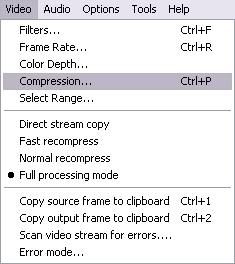
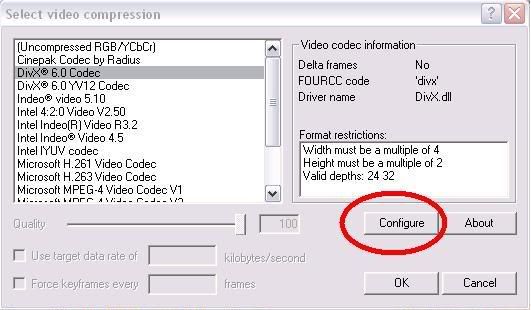
2. Go to Video > Compression > Select DivX > Click Configure.


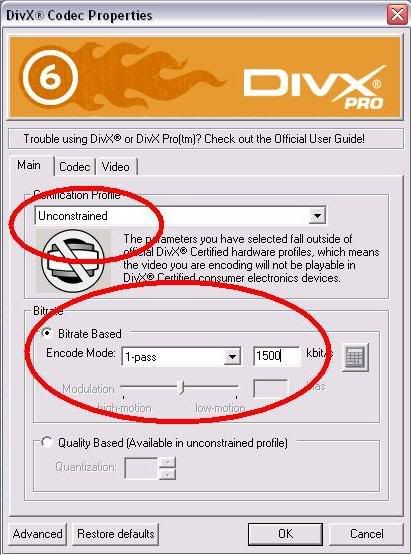
3. In Main tab > Keep Certification Profile as Unconstrained > in Bitrate > 1-pass & keep value as 1500kbps.


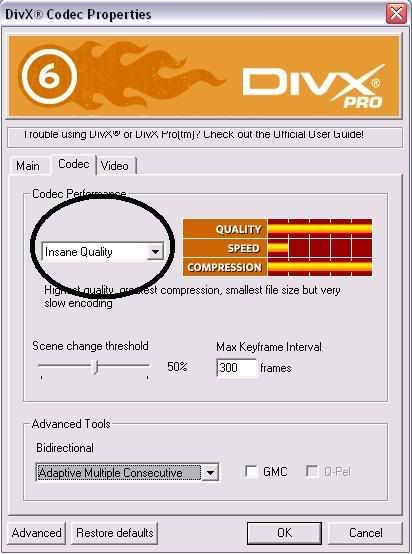
4. In Codec Tab > keep settings as INSANE Quality. This is MOST Important, Dont change this!!


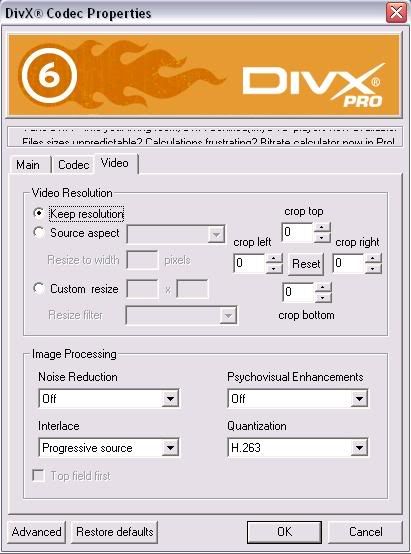
5. In Video tab > u can keep settings as per ur preference but Do not increase the resolution of ur image. Now u can come out of DivX settings.


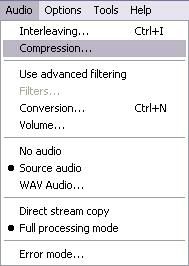
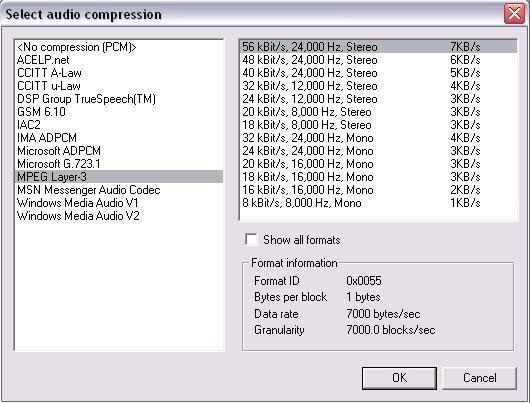
6. In Audio Tab > Select Full Processing Mode > Then Select Compression > MPEG LAYER - 3 > and keep 24kBits/s mono for normal video and 56kBits sterio for a video which contains music ;).


NOTE : Selecting INSANE Quality option is going to take hell lot of time so be patient. If u r in hurry u can select any of the other options but that is gonna affect quality. In Audio Compression You can select NO Compression as well, but that is gonna make file size bigger ;).

Using Virtual Dub for Taking Caps

1. Open the Video in VirtualDub. Make sure u have VDUB MPEG2.


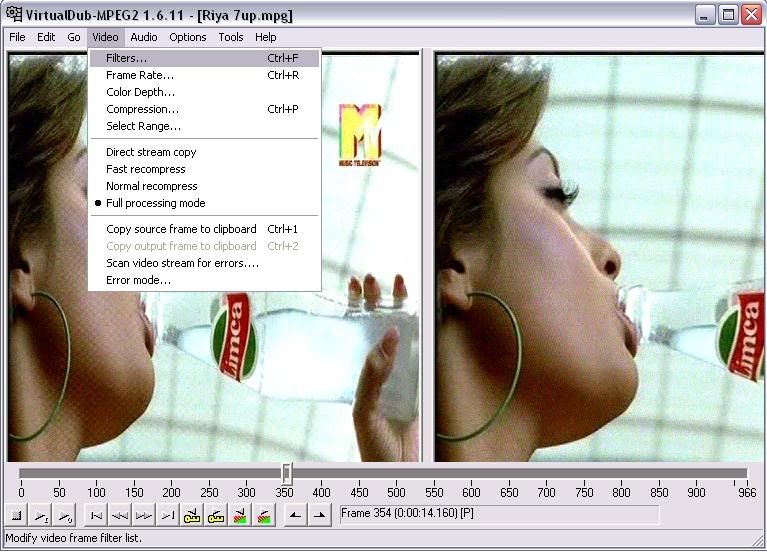
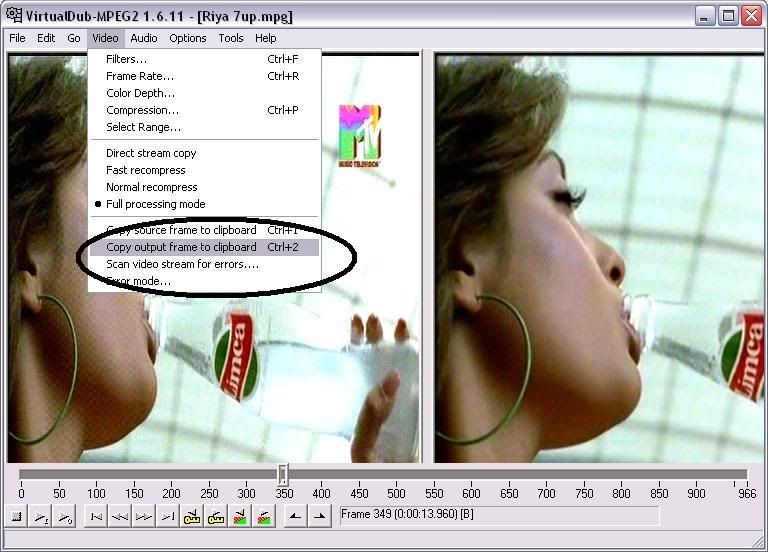
2. See the below pic. You can see the bar... u can capture the images frame by frame here. But wait... we can use VDub features to improve the quality, which we will see in next step.


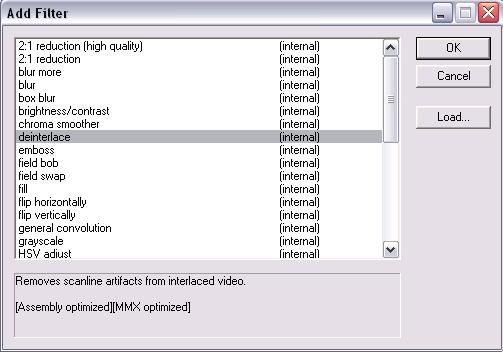
3. GO to Video > Filter > Select Deinterlace Filter > select Blend Fields together [best] option.


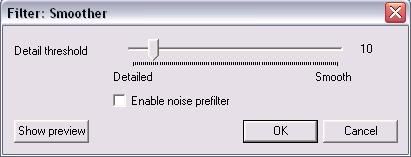
4. Again goto Video > Filter > select smoother > keep value as 10 or as per ur preference ;).


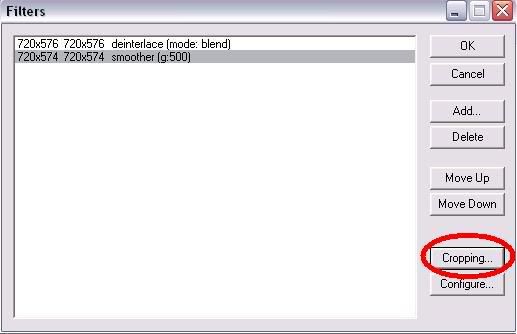
5. You can also crop unnecessary areas in the frame with the "cropping" option shown in the below pic.


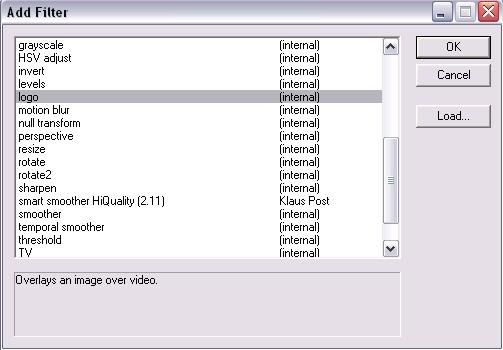
6. If u wish to watermark ur caps / video, then there is a logo option in the filters list.


7. Now u r done with settings for making caps... u can copy the output source to clipboard and save with either paint or using photoshop ;).


Improving quality of caps in Photoshop (CS2) :

If you have taken snapshot from TV Tuner then u can directly open that in photoshop or if u r using VDUB then copy the output source clipboard and paste in photoshop.

1. Open image in photoshop. Select Filter > Noise > Dust & Scratches > Input 2 to both Radius & Threshold then press OK.

2. Again Select Filter > Noise > Reduce Noise > Enable Preview > Select Basic > Settings-Default > Strength-5 > Preserve Details-11, Reduce Color Noise-74, Sharpen Details-21. Dont forgtet to Enable Remove JPEG Artifact ;). Press OK.


All the Process is complete now.

You can alter the values according to your satisfaction.

Tutorial on TV Capturing, recording & Producing High Quality Videos using VirtualDub!

TV capturing and producing High quality Videos is very lenghty and tiring process if u dont know anything, and this Tutorial is going to make everything simple for you. It took me six months to learn several aspects of this process.

Steps before Setting up your TV Tuner.

1. First and very Important step is to confirm that you get Cable Connection directly from the Emplifier and to the max only ONE Split in the connection .

2. I use PINNACLE PCTV.Experts suggest to go for Pixel View TV Tuner Card so go for it if r planning to purchase a new one.

Settings in TV Tuner.

1. After Installation, run auto channel scan.


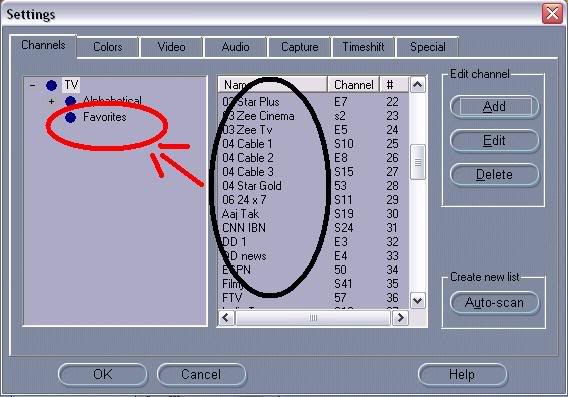
2. You can also rename the channles and u watch only selected channels then u can drag them into favourite folder for quick access.


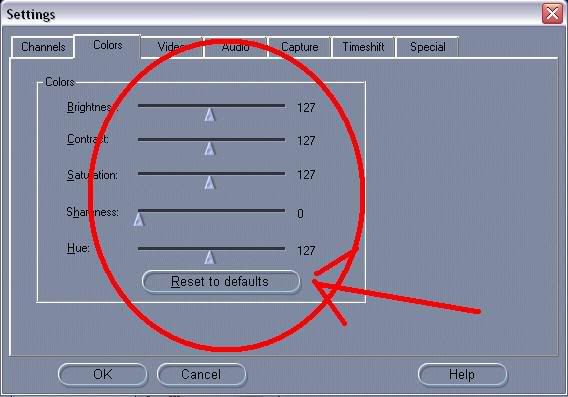
3. You can change colour settings as per your requirement, but I prefer not to change it and let it remain as DEFAULT.


4. Select "2 fields deInterlaced" option in Video Display. This is the MOST IMPORTANT step for clarity of Video.


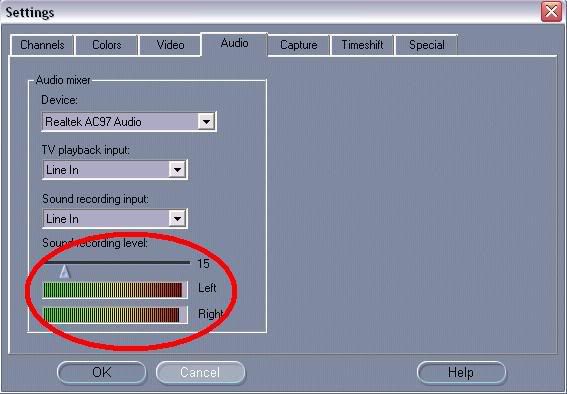
5. Keep sound recordning level as low as possible. I prefer to keep at 15-20.


6. Capturing is most important part. The higher quality of video u record, higher quality of video u can produce, its as simple as that.
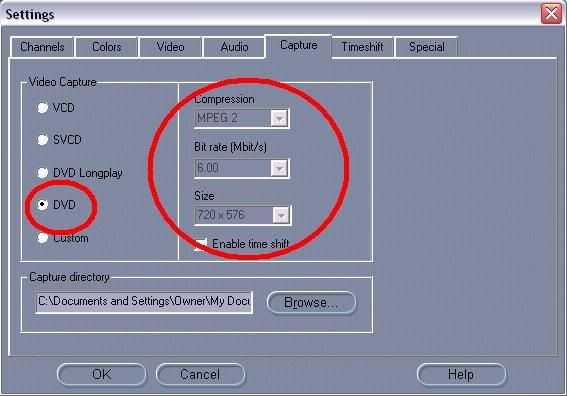
I record video in DVD MPEG2 format. bitrate 6 Mbits/s and Video size 720 x 576.


We are done with Settings in TV Tuner. Second part is to Make high Quality Caps

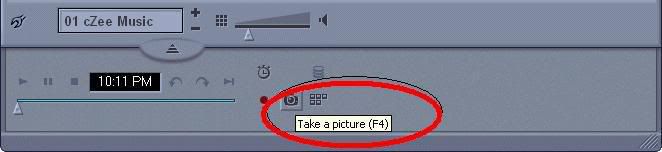
Note : Every TV Tuner has this option, which is highlighted in below image. You have to be very accurate to cap in fraction of second. But wait, we have a second option and that is VirtualDub.

How to RIP BLURAY/HD-DVD/DVD into MKV Files

In This tutorial you will learn how to rip Any Video Disc Format to MKV Files.
Make Sure you have More than 100GB Free When Doing this. Because the Entire Process will use approx 75-100GB but when you are done, you can delete everything you do not Need to use.

This Ripping Tutorial Does Not Support the Movies that Split the movie Files into Parts. You Can Tell by the File Size. If the Biggest M2TS File is more than 15GB

Before you Start, You need to install the Following Programs
Me GUI 3.1.1028 - 3 Mirrors

http://rapidshare.com/files/248666022/Backup-CONVERT.zip
  http://www.megaupload.com/?d=9O3OLEUF
  http://d01.megashares.com/dl/d447c97/Backup-CONVERT.zip
  
AnyDVD HD 6.5.5.9 (Lastest Version) - 3 Mirrors
http://rapidshare.com/files/248665924/Backup062509-ANY.rar
  http://www.megaupload.com/?d=Q1YJCZ1W
  http://d01.megashares.com/dl/5543f89/Backup062509-ANY.rar
  
I Cannot Find a Working Key for the Latest Version, but i did include the Trial Reset for the fact that after 21 days you will have to Reset it again.

Step 1:
Install ANYDVD HD 6.5.5.9 then Restart then install Me GUI 3.1.1028 and then do all the updates for Me GUI 3.1.1028.

Step 2:
Please go to Settings in ANYDVD HD 6.5.5.9
Under Video Bluray Tab
Posted Image
Under Video DVD Tab
Posted Image
Under Video DVD Tab - Settings
Posted Image
Under HD-DVD tab
Posted Image

NOTE: You will have to Do this every time unless you have the full version of AnyDVD HD 6.5.5.9

Step 3:
Right Click AnyDVD in your Tray Icon and Click "Rip Video DVD to Hard Disk"
Then Choose the Drive you want to do Rip to the Computer then Click "Copy DVD"
Posted Image
Posted Image
Note: It Takes a While about 75 Minutes for a Core i7 with a 6x Blu-ray Drive. Not Overclocked.

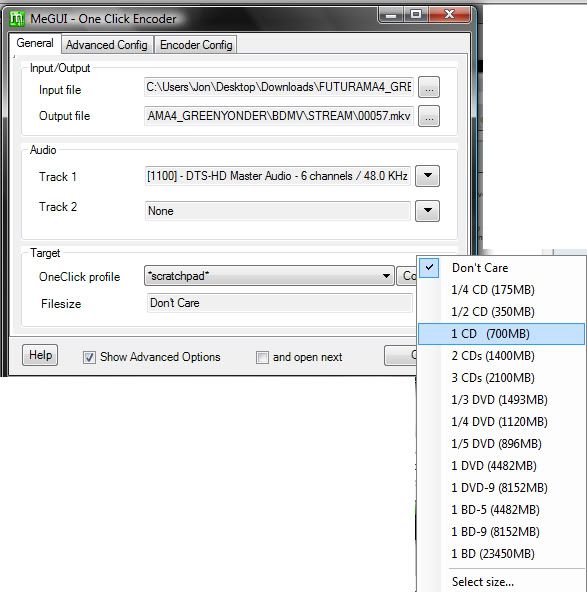
Step 4: Click the One Click Encoder at the Bottom of Me GUI.
Input File: The Biggest File in the STREAM Folder that you Extracted Before; if on Bluray
The Biggest evo File if HD-DVD
The Biggest vob file if DVD.
Posted Image
If you Want to You are Able to Select a Size of the Output File. I Personally Like 1 CD (700 MB). But if you Guys Like the Highest Quality id Select DVD-5 or DVD-9. This Will Result in a Faster Encoding Time, but Poorer Quality. After you Hit "Go!" go the the Queue and Click "start"

If you Wish to have Good Quality while Keeping the File Size like the m-HD Files or the 300 MB MKV Files please look below. The Next Steps are for the Best Possible Audio with the Best Quality Picture at the Size you Want. Please Do Steps 1-3 the way i stated before. Do Not Do Step 4 stated above if you to do this.


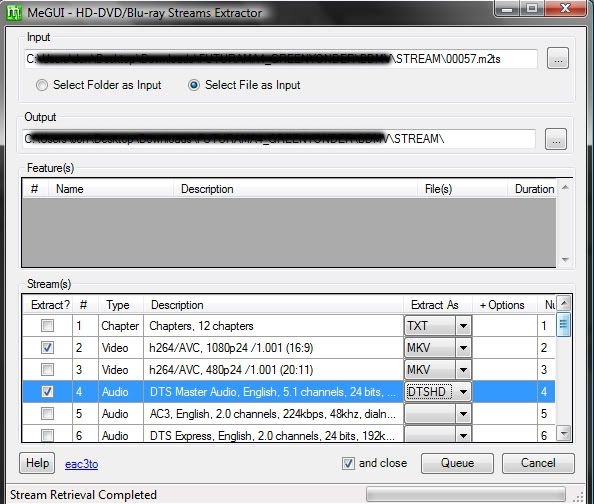
Step 4: First what we are going to have to do is extract the HD Stream, which is Control + F7 in Me GUI or Tools -> HD Stream Extractor.
Please Choose "Select File as Input" that way you can Get what you want. The Correct file is usually the Biggest File in the "Stream" folder that you Extracted with AnyDVD HD; or the Video_TS. In My Case it is "0057.m2ts" This File will vary depending on the Movie. I would recommend only extracting One Audio File because This Program Only Supports One. and i Chose DTS-HD to Encode the Audio as, but if you want Smaller; but same quality choose AC3
Posted Image
After you do this Click "Add to Queue" then go to the Queue Tab in Me GUI and Click Start. After this is Finish Click Remove it from Queue.

Step 5: This Step will be pretty easy all you will have to do is Press Control + R or go to AVS Script Creator. This Step is the Easiest of them all.
Posted Image
You Input the File (mkv) then Hit Save. This is where you can resize the file check the box that says Resize.
1080p: 1920x1080
720p: 1280x720p

Step 6: This Step you will have to choose all the files to import into Me GUI.

Audio Input: File from Step 4 either Ac3 or DTS-HD
Encoding Settings: Nero AAC-64 for 300MB
Nero AAC-256 for 700 MB
Winamp AAC-256 for Anything Else

Click Auto-Encode
Posted Image
Click Queue. if you want to add subtitles you can do so by checking the box "Add Additonal Content, Audo, Subtitles, Chapters" Make SURE CONTAINER is MKV in both the main MeGUI Screen and also the Auto Encode Screen. This is also choose the of output file. you can do it several ways. Select a Size. by bitrate and No Target Size.


Go to the Queue Tab in MeGUI then Click Start. This Process takes a long time and just wait. it takes about 4 hours to make a 700 MB Mkv File at Priority Set to Low.